Why Enterprise AI Adoption Fails
Why successful enterprise AI adoption takes more than buying licenses and granting access.
Enterprise AI adoption is often treated like a procurement problem. Find a tool, negotiate a contract, purchase licenses, provision access, send an announcement, and congratulations! Your organization is now AI-enabled.
Except... not really.
You might have thousands of employees with access to an AI tool, but how many actually use it? How many are getting meaningful value out of it? How many tried it once, got an underwhelming response, and never opened it again?
In my experience working with developer tooling and enterprise AI operations, I've learned that getting people access to a tool is usually the easy part. Getting them to adopt it is an entirely different problem.
The mistake is treating AI adoption as an IT deployment when it should be treated more like a product.

Deployment Is Not Adoption
Let's say your organization purchases 1,000 licenses for an AI assistant.
IT provisions the accounts, Security approves the tool, leadership announces the rollout, and everyone receives an email explaining how to get started.
Three months later, only 400 people are actively using it.
What happened?
It's easy to assume the remaining 600 employees simply aren't interested in AI. Maybe they're resistant to change, or maybe they just need another reminder.
But think about it from their perspective.
They received access to another application in an already crowded software environment. Nobody showed them how it fits into their job, explained why it's better than their existing workflow, or even clarified what they're allowed to use it for.
Why would they change the way they work?
Availability does not create demand, and access does not guarantee adoption.
Unlike a ticketing system or other purpose-built software, a general-purpose AI assistant doesn't necessarily have an obvious use case. The possibilities are practically endless, but that also means employees have to figure out what to do with it.
And that's where organizations need to step in.
Your Users Are Not AI Engineers
If you're spending your day evaluating models, experimenting with agents, writing prompts, and integrating APIs, it's easy to forget that most employees aren't doing any of those things.
And frankly, they shouldn't need to.
Someone in Finance shouldn't have to understand reasoning models to summarize a spreadsheet. Someone in HR shouldn't need to become a prompt engineer to draft an internal announcement.
They're trying to accomplish a task, not learn an entirely new technical discipline.
This is where enablement becomes important.
I don't mean sending out a 40-page PDF explaining every feature of the platform. I mean showing people how the tool solves problems they already encounter.
- Show Finance how to analyze spending patterns.
- Show HR how to draft communications.
- Show Engineering how AI can help investigate unfamiliar code.
The same goes for governance. If employees don't understand what company information they're allowed to share, they'll either avoid the tool entirely or risk using it incorrectly. Clear guidelines should make the approved path the easiest path.
The goal isn't to turn every employee into an AI expert. It's to make AI useful enough that they naturally incorporate it into their workflow.
A good training session should leave someone thinking, "Oh, I could actually use this tomorrow." Not, "Wow, that technology is impressive."

Listen to Your Users
Usage dashboards are great at telling you what is happening, but they're not always very good at telling you why.
Imagine an employee who used an AI assistant every day for two weeks and then suddenly stopped.
Your dashboard can show you that drop-off, but it can't tell you whether the responses weren't useful, the tool was too complicated, or their particular workflow simply wasn't a good fit.
Sending another company-wide reminder won't fix any of those problems.
Sometimes the most useful thing you can do is ask.
I've experienced a similar lesson maintaining Transmute, my open-source file converter. Some of the most valuable improvements came from users opening issues about things I hadn't considered confusing or inconvenient.
Those users were effectively telling me where the product was failing them.
Enterprise AI users can do the same thing, but you need to give them an opportunity to provide that feedback, whether through office hours, surveys, or direct conversations.
And don't just collect feedback to fill out a quarterly report. Use it to change something.

Measure What Actually Matters
One of the more frustrating things about enterprise software is how often success gets reduced to a single number.
"We purchased 1,000 licenses and 900 people logged in this month. Great adoption!"
Maybe. But what does that actually tell you?
Someone might have opened the application, asked one question, and immediately closed it. Another employee might use it three times a week to save hours of manual work.
Both count as active users, but they represent very different levels of value.
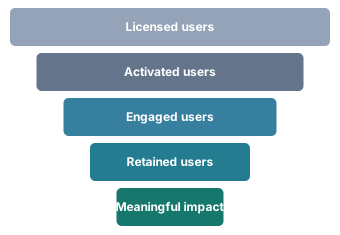
I think AI adoption should be measured across three main areas:
- Activation: Are employees actually trying the tools they've been given?
- Engagement: Are they coming back and incorporating the tools into their workflows?
- Impact: Is that usage improving how work gets done?
Low activation might indicate an awareness or onboarding problem. High activation but poor engagement suggests employees are willing to try the tool but aren't finding enough value to continue.
And even strong engagement doesn't automatically mean productivity gains. You still need to understand whether the tool is saving time, eliminating manual steps, or improving the quality of work.
Don't confuse activity with value, but don't ignore activity either. You need both to understand what's happening.
Treat the Rollout Like a Product
A product team doesn't release an application, send an email, and assume its work is finished.
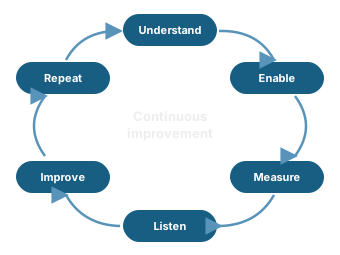
They watch how people use it, investigate where users get stuck, improve the experience, and measure whether those changes helped.
Enterprise AI should be managed with that same mindset.
Identify useful workflows, provide relevant training, measure adoption, collect feedback, and make improvements based on what you've learned.
Then do it again.
AI tooling changes quickly. Models improve, new capabilities appear, and workflows that weren't practical six months ago may suddenly become worthwhile.
A rollout strategy that worked at launch may not be the right strategy a year later.
Procurement gets the software into the organization. Everything that happens afterward determines whether the investment was worth it.